In AGY-native development, you don’t write PDF extraction scripts or craft BigQuery SQL schemas by hand. The code and data pipelines are implementation details managed entirely by antigravity-cli (agy).
What follows is the sequence of prompts and evolutionary steps I used to turn 700+ raw bank statement PDFs across all my financial institutions into a private family financial warehouse. If you want to recreate this system, follow this sequence in order.
Step 1: Hardware & Architecture Audit with AGY
Before parsing statements or configuring cloud tables, start by telling AGY what data and hardware you have available and evaluating your architecture options together.
Prompt to AGY: “I have a large number of monthly bank statement PDFs spanning several years across all my financial institutions downloaded to my Desktop. I want to build a private family financial warehouse to analyze cash flow, track fee drag, and run retirement models. What is the best architecture to host this securely?”
Evaluating Options with AGY: We contemplated using a purely local SQLite database versus a cloud warehouse like Google BigQuery. AGY evaluated the tradeoffs:
- Pure Local SQLite: Simple, but harder to scale complex multi-year SQL analytical views across dozens of accounts.
- Google BigQuery Warehouse: High-performance relational SQL views, zero server maintenance, and simple integration via Google Cloud MCP tools.
To protect privacy, AGY established a strict rule: All PDF parsing and PII masking (scrubbing account numbers into masked suffixes like XXXX-3555) must happen 100% locally via Ollama before any data is sent to BigQuery.
Step 2: Establish Ground-Truth Context & Estate Rules
Rather than typing markdown files by hand, instruct AGY to organize the knowledge base for your family’s financial rules.
Prompt to AGY: “Help me organize the ground-truth knowledge base for my personal finance project in a
knowledge/folder. Ask me about my bank account inventory, recurring escrow bills, insurance policy limits, and estate planning documents, then write the markdown files.”
What Happens Here:
You go through a short series of conversational prompts describing your financial picture. AGY structures, formats, and authors all the files in knowledge/ for you:
knowledge/account_inventory.md: Master list of accounts across all institutions.knowledge/escrow_and_recurring.md: Property tax escrow obligations, recurring utilities, and fixed household overhead.knowledge/estate_and_wills.md: Summary of wills, trust structures, and insurance policy coverage limits.
Step 3: Bulk Parse Raw PDF Statements On-Device (v1 Ingestion)
You don’t write PDF extraction code or specify regex patterns. You simply drop the raw statements into a folder and let AGY manage the extraction on-device.
- Drop Statements in Folder: Bulk-download your statement PDFs from bank portals into a local Desktop folder (
~/Desktop/financial_statements). - Prompt AGY:
Prompt to AGY: “I dropped a large number of PDF statements across all my financial institutions into
~/Desktop/financial_statements. Use local Ollama to parse all the transactions on-device, mask account numbers so no unscrubbed PII leaks, and format the clean transaction records for loading.”
What Happens Here: AGY authors and executes an on-device extraction pipeline in the terminal. Local Ollama parses the distinct bank PDF layouts (checking, credit cards, brokerages, 529 plans) and scrubs PII locally. Unscrubbed account numbers never leave your local machine.
Step 4: Provision BigQuery & Author Single-Source-of-Truth Views (v2 Warehouse)
Setting up cloud infrastructure like Google Cloud Platform (GCP) and BigQuery doesn’t require searching online tutorials. You can have an interactive discussion with AGY if you need help creating your GCP Project ID, linking billing, or configuring GCP Model Context Protocol (MCP) integrations in Antigravity.
-
Interactive GCP & MCP Setup Discussion:
Prompt to AGY: “I need to set up Google BigQuery for this project. Walk me through creating my GCP Project ID, linking billing, and connecting the GCP MCP tool integration to
antigravity-cli.”What Happens Here: AGY walks you step-by-step through creating your GCP Project ID, linking your billing account, enabling the BigQuery API, and authenticating MCP tool endpoints so AGY can query and manage BigQuery directly from context.
-
Provisioning Datasets & SQL Views:
Prompt to AGY: “Load all the parsed CSV transactions into a Google BigQuery dataset (
personal-finance-warehouse) using GCP tools. Create single-source-of-truth SQL views for cash flow, portfolio fee drag, and fraud anomaly detection. Also configure a GCS bucket rule to archive the raw PDFs cheaply for taxes.”
What Happens Here:
AGY creates the BigQuery dataset tables, loads the transactions, and configures a GCS bucket lifecycle rule (archive raw PDFs after 365 days at $0.0012/GB/month). It then authors four single-source-of-truth SQL views:
- Monthly Cash Flow View: Tracks 3-month rolling averages and spending variance.
- Fee Drag View: Highlights advisory billing percentages and expense ratios across brokerages.
- Fraud & Anomaly View: Flags duplicate charges, micro card testing ($0.01–$3.00), and statistical spending outliers.
GCP Cost Safety & Guardrails:
To prevent unexpected query charges on Google Cloud, AGY configures DRY_RUN scan checks before executing queries to verify totalBytesProcessed stays within free tier limits, keeping scan costs to pennies. I configured this with AGY simply by asking it to develop a plan and then a set of controls to inform me of projected GCP costs.
Step 5: Brainstorming New Capabilities with AGY (v3 Expansion)
AGY-native development isn’t just about executing planned builds—it’s a conversational partner for brainstorming new capabilities as real-life needs arise.
Prompt to AGY: “Can you track my work expenses to ensure I am submitting everything I should be and getting reimbursed properly?”
AGY’s Proposed Solution: Instead of just listing charges, AGY proposed building a three-way match system. It suggested creating a pipeline in BigQuery to automatically compare:
- Work Credit Card Statements (every expense charged).
- Concur Expense Reports (every claim submitted).
- Personal Bank Account Deposits (every reimbursement payout).
Human Approval: “Go for it.”
What Happens Here: Without me writing a single technical requirement or database schema, AGY designed the reconciliation logic, built the BigQuery tables and views, and stored all required matching history automatically. Now the system flags any unsubmitted work charges or uncollected reimbursements.
Step 6: Codify Financial Modeling into Reusable AGY Skills (v4 Intelligence)
Shift your mindset from maintaining custom code scripts to building reusable AGY Skills.
Prompt to AGY: “Build reusable skills for Monte Carlo retirement stress testing and 529 college savings projections. Save them in my project skills directory so I can run financial models directly on command against our BigQuery balances.”
What Happens Here:
AGY codifies the simulation math into reusable skill packages (such as 529-modeling and fee-drag-analysis). Whenever bank statement formatting changes in the future, you don’t rewrite code—you simply ask AGY to update its extraction skill.
Visual Architecture & Workflow
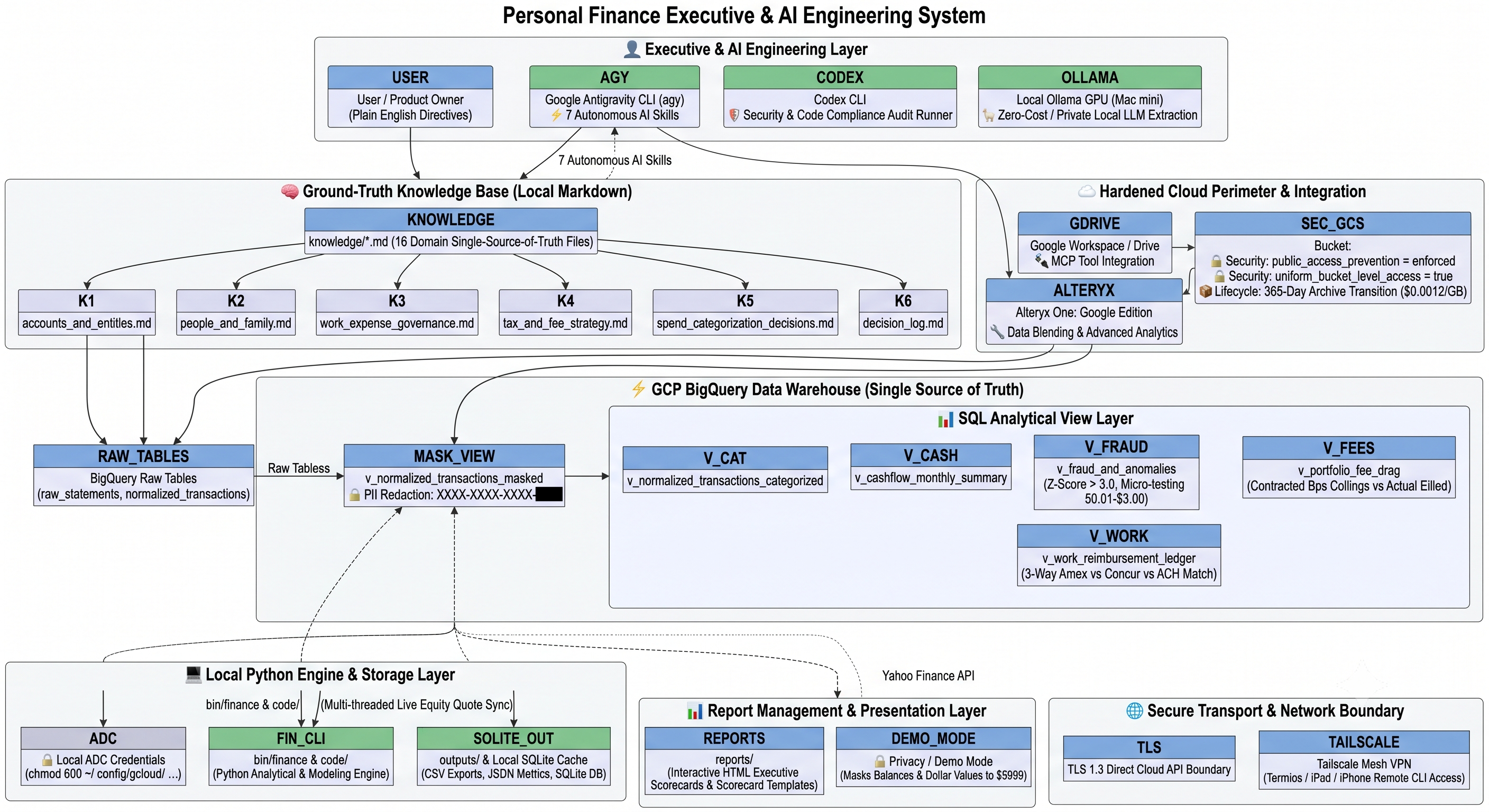
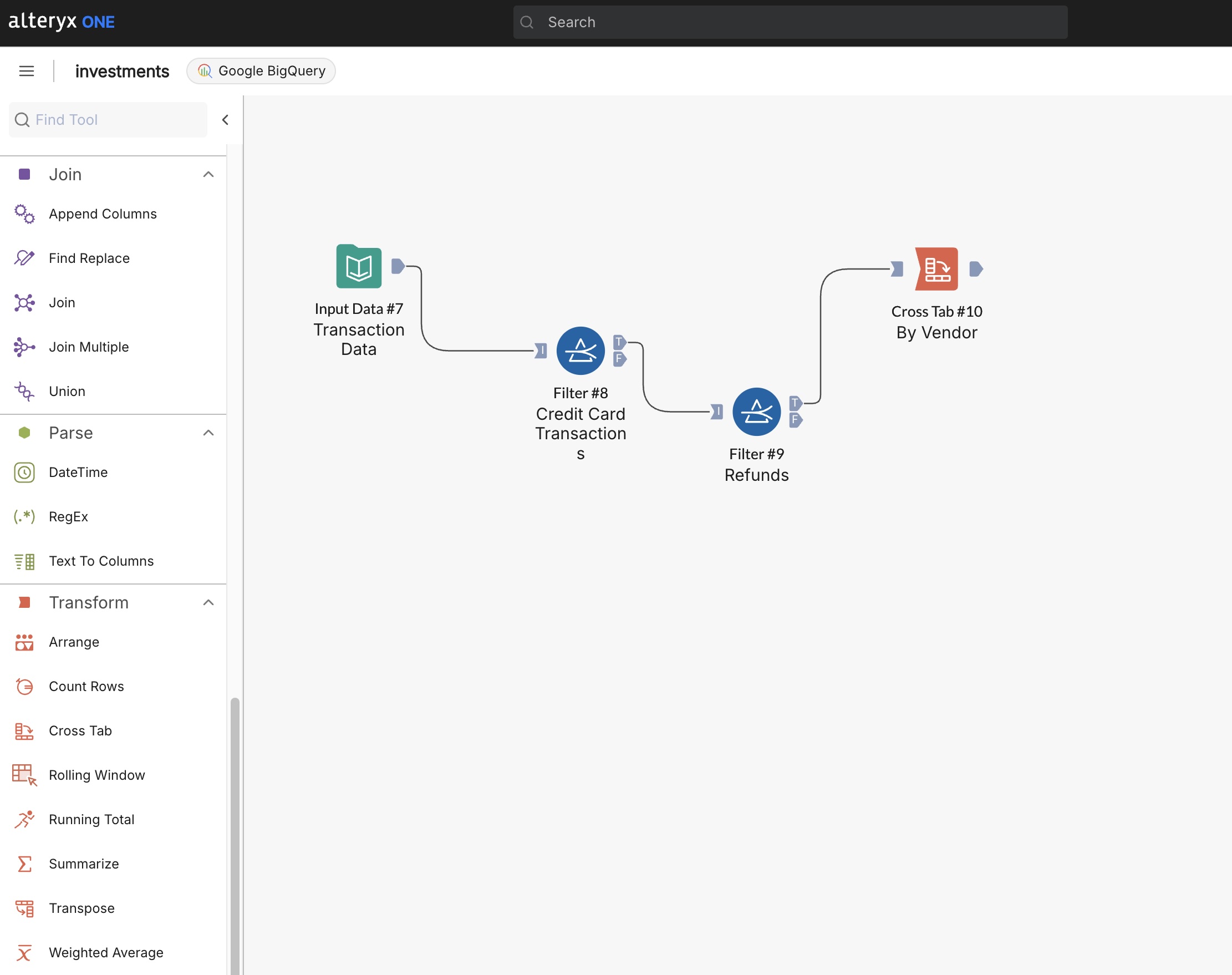
Custom reporting example:
Summary of the Evolutionary Build Process
| Phase | Human Intent / Prompt Focus | System Capability Added |
|---|---|---|
| Step 1: Architecture Audit | “What is the best architecture for PDF statements?” | Evaluated local SQLite vs BigQuery; mandated 100% local Ollama PII scrubbing |
| Step 2: Grounding | Created plain-text knowledge/ files | Established single source of truth for accounts, escrow, & estate documents |
| Step 3: On-Device Parsing | “Parse PDFs locally via Ollama & mask PII” | Extracted transactions across all bank PDF layouts without cloud PII exposure |
| Step 4: Cloud Warehouse | “Load data into BigQuery & build SQL views” | Created BigQuery warehouse, GCS tax archive rules, & cost guardrails |
| Step 5: Ideation & Expansion | “Can you track work expenses & reimbursements?” | AGY designed & built 3-way match system (Card vs Concur vs Bank deposits) |
| Step 6: Reusable Skills | “Package Monte Carlo & 529 projections into skills” | Built reusable AGY skill library (529-modeling, fee-drag-analysis) |
Operating the System Day-to-Day
Once AGY completes this setup, ongoing financial management is completely hands-off:
- Monthly Ingestion: Bulk-download new PDFs to your Desktop folder and tell AGY: “Parse new statements and load them into BigQuery.”
- Run Projections: Ask AGY: “Run the 529-modeling skill against current BigQuery balances.”
- Audit Expenses: Ask AGY: “Show me any fee drag, anomalous charges, or un-reimbursed work expenses.”
By focusing on plain-English intent and iterative conversations, you act as the family CFO while AGY handles all PDF parsing, SQL view creation, cloud data loading, and financial modeling behind the scenes.
Read the main narrative story: A Private CFO for the Family Books.
Comments welcomed: